Agentic Workflows for Crypto Research
Use an AI coding agent with the Glassnode CLI to go from research question to results in minutes.

AI coding agents are changing the way analysts and researchers interact with data. Instead of writing scripts line by line, you provide a hypothesis or research question to an AI agent and – it writes the code, fetches the data, runs the analysis, and returns results.
In this article we present a step-by-step real-world example: Asking an AI agent to download data via the Glassnode CLI, run a statistical analysis, and generate publication-ready charts, all from natural-language prompts.
What you will need
- Access to an AI agent
We use Claude Code in this walkthrough, but any agent able to execute Python and shell commands will work, including ChatGPT's Codex, Cursor, Github Copilot, Google Gemini CLI, OpenClaw, or similar tools.
- The Glassnode CLI (
gn)
A command-line interface for the Glassnode API. Install it and configure your API key by following the Glassnode CLI docs. An API key is required.
The prompt
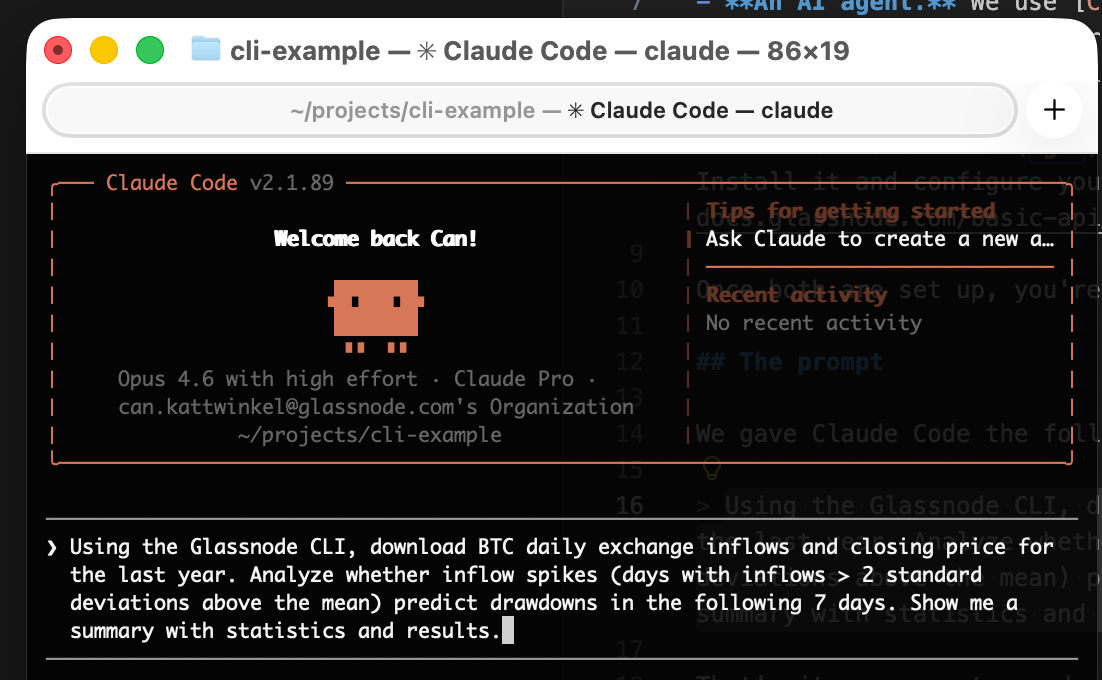
We will evaluate the following hypothesis: Extreme BTC exchange inflow events are predictive of 7-day forward drawdowns. To do that, we will instruct Claude Code using the following prompt:
Using the Glassnode CLI, download BTC daily exchange inflows and closing price for the last year. Analyze whether inflow spikes (days with inflows > 2 standard deviations above the mean) predict drawdowns in the following 7 days. Show me a summary with statistics and results.
That's it. One sentence describing the question, and another sentence defining the methodology. The agent takes it from there.
What the agent does
Behind the scenes, the agent executes a sequence of steps:
- Discovers the right metrics by running
gn metric listandgn metric describeto find the correct metric paths and valid parameters. - Downloads the data via
gn metric get, saving CSV files for both exchange inflows (transactions/transfers_volume_to_exchanges_sum) and closing price (market/price_usd_close). - Writes and runs a Python analysis that computes the spike threshold, identifies spike days, calculates forward 7-day max drawdowns, and compares spike days to normal days.
The agent comes back with a readable summary:
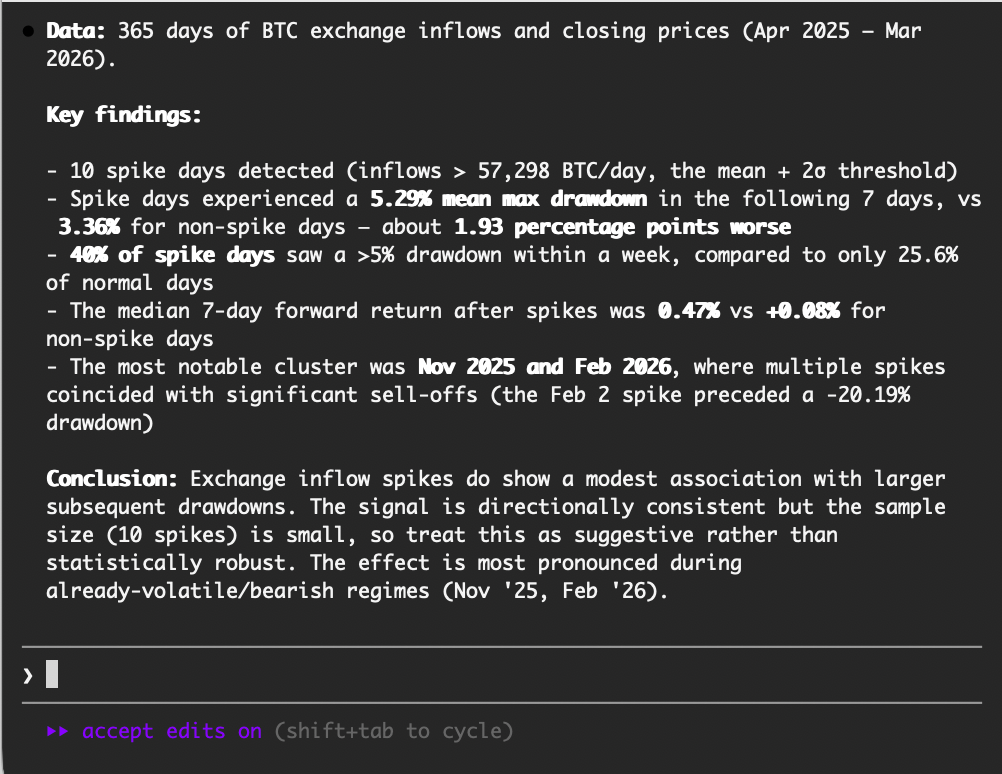
While this is just an illustrative example, our experiment does reveal a moderate association between exchange inflow spikes and subsequent drawdowns. Spike days see roughly 1.9 percentage points more drawdown on average. That said, with only 10 spike days in the sample and the effect concentrated in two volatile periods, the signal is suggestive rather than statistically robust. A rigorous backtest would need to account for overlapping windows, control for volatility regimes, use point-in-time data, and validate out-of-sample.
Visualizing the results
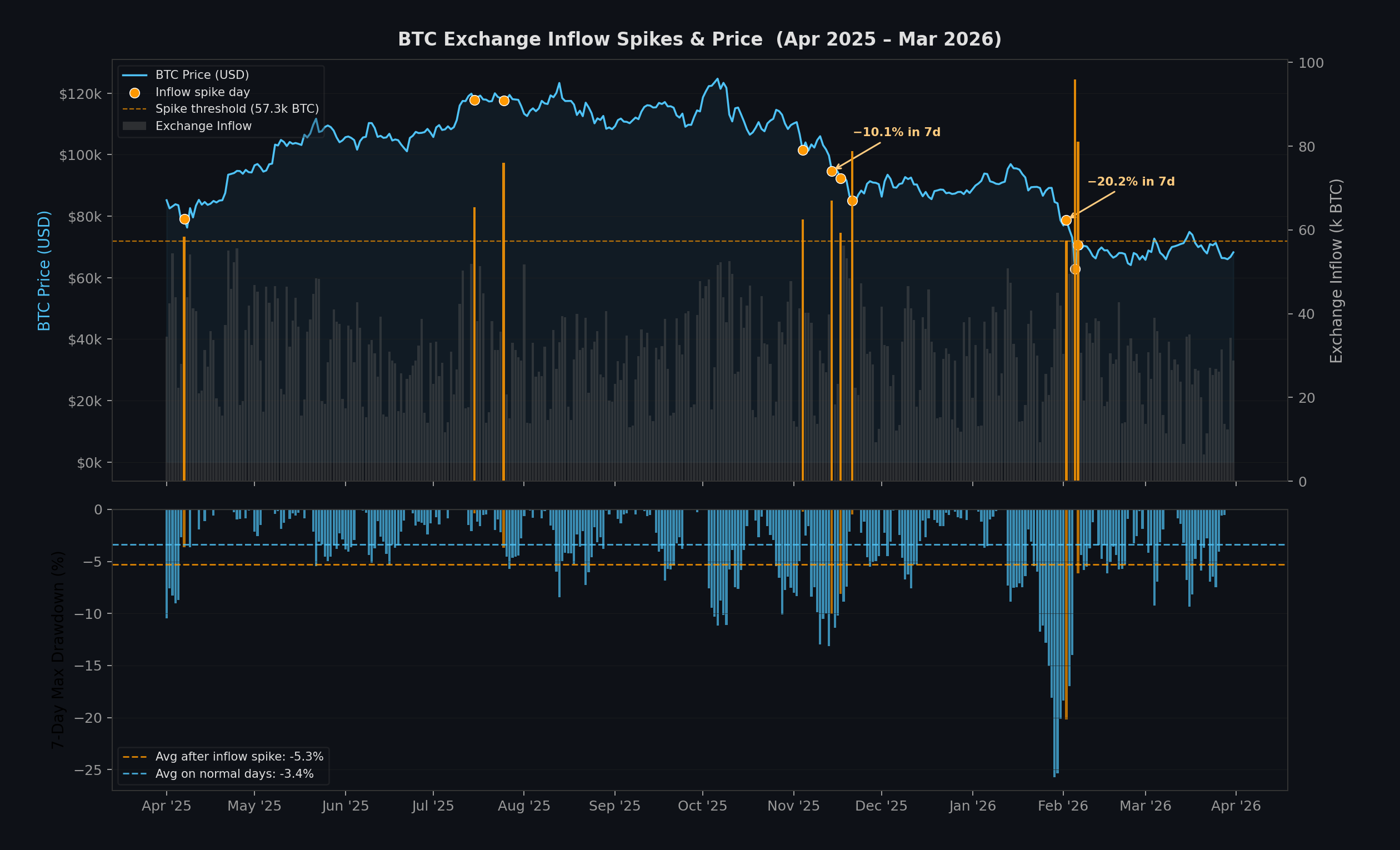
Visualizing the data is a good way to validate whether the numbers hold up. In this process, a simple follow-up prompt is enough:
Create a visualization that shows the data as a timeseries.
From here, you can keep iterating: adjust the chart, refine the analysis, or take the research in a different direction, all through natural language conversation.
Get started with AI Crypto Research on Glassnode Data
The Glassnode CLI requires an API key, available to Glassnode Professional subscribers.
- Install the Glassnode CLI and configure your API key. See documentation
- Open your preferred AI coding agent (Claude Code, Codex, Cursor, Gemini CLI, OpenClaw, etc.)
- Start prompting. Try questions such as:
- "Download ETH staking deposits for the last 6 months and plot the trend"
- "Compare BTC and ETH exchange netflows over the last 90 days"
- "Find which metric has the highest correlation with BTC 30-day returns"
The Glassnode CLI allows agents to discover and retrieve metric data without requiring manual API lookup or writing boilerplate code. Combined with an AI coding agent, the Glassnode CLI turns a research question into results in minutes.
If you want to learn more about the metrics available on the Professional plan, or to gain access to these metrics, contact our dedicated team today.
- Follow us on X for timely market updates and analysis
- Join our Telegram channel for regular market insights
- For on-chain metrics, dashboards, and alerts, visit Glassnode Studio
Disclaimer: This report is for informational and educational purposes only. The analysis represents a limited case study with significant constraints and should not be interpreted as investment advice or definitive trading signals. Past performance patterns do not guarantee future results. Always conduct thorough due diligence and consider multiple factors before making investment decisions.
